10 things every service business website needs in 2026
A service business website needs a clear offer, accurate coverage, relevant proof and a contact route that works. The most useful improvements help customers decide whether you can solve their problem and help your team turn that interest into a qualified booking. Use these ten checks before spending more on traffic.
- Explain the service and coverage before asking for an enquiry.
- Make proof and practical answers easy to find.
- Test the handoff from website request to real conversation.
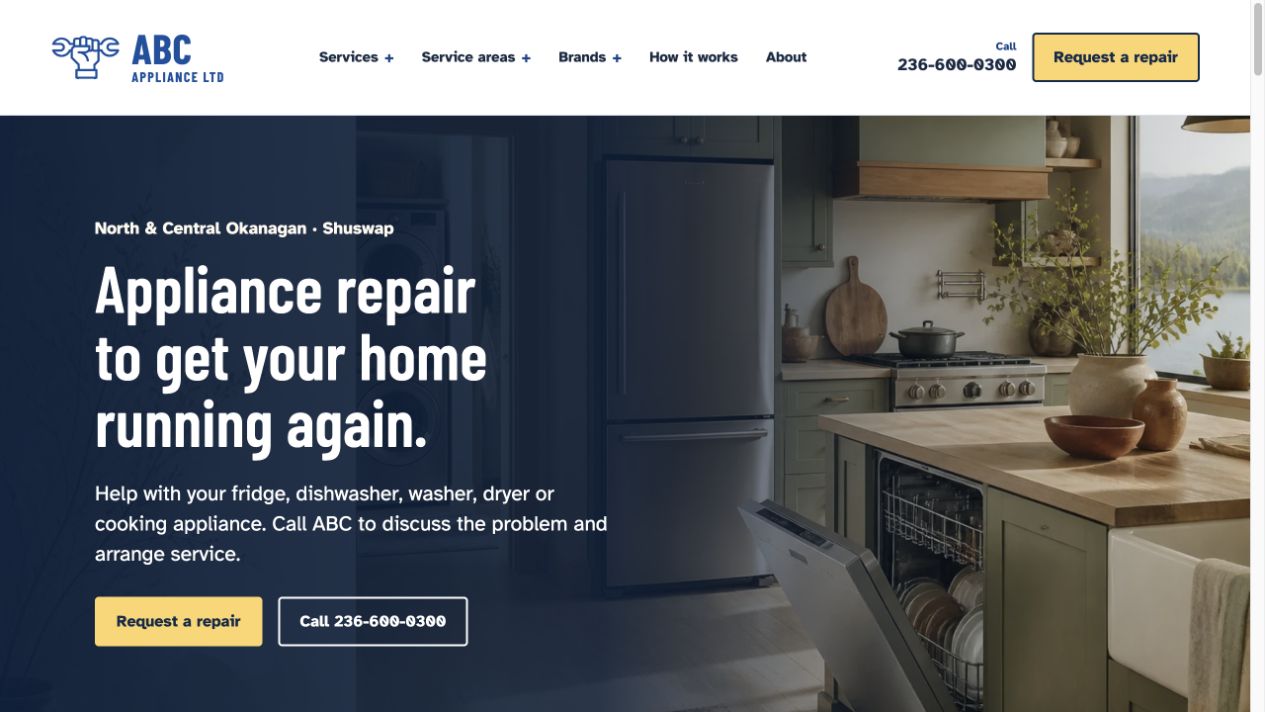
1. A headline that says what you do and where
Your opening headline needs to tell a visitor what service you provide and where you provide it. “Appliance repair in Kelowna and the Okanagan” is useful. A vague statement about quality is not. Back up any broad claim with specifics: relevant experience, a defined specialism or a practical way you handle the problem. If you offer scheduled repairs, say that. Do not suggest round-the-clock emergency response just because the phrase gets clicks.
2. A page for each important service
Give each important service its own page, because different customer problems need different answers. A plumber’s drain-cleaning page and renovation-plumbing page require different scope, preparation details and enquiry information. On each page, describe the problem, explain what the work includes, walk through the process and show the next step. Include real photographs or project examples where you can. The plumber website page and appliance repair website page show the industry-specific planning I bring to a build.
3. Honest location and coverage information
Be direct about where you work. List the communities you actually serve and explain any meaningful restrictions, travel arrangements or differences between services. For an Okanagan business, coverage might extend across more than one city. Name those places accurately, then add separate local pages only when you have useful detail to provide. Keep a real office address distinct from an area you visit for work.
4. Proof beside the decision it supports
Put proof beside the decision it supports, and make it relevant to the service being considered. Show a completed job, explain the work involved or use an approved customer comment with appropriate attribution. Place that evidence near the service description or enquiry action. Cool Runnings’ website, local SEO and conversion work brought a 30% increase in qualified bookings. The project story connects that result to the work. Your proof might be a careful installation, a well-documented process or a distinctive finished project rather than a percentage.
5. Answers to the questions asked before booking
Answer the questions that actually determine whether someone will contact you. Start with the questions the owner repeatedly answers: what is included, what information to send, whether a visit is needed and how estimates work. Place essential answers in the main content and use a short FAQ for specific follow-ups. If you cannot offer a fixed price, explain what changes the quote. Clear scope is more useful than an empty “contact us for details” repeated under every question.
6. A contact action matched to the service
Your contact action needs to match what your operation can actually deliver. “Request an estimate,” “Book an appointment” and “Ask for a callback” are different commitments. Choose the right one and place it near useful information, then repeat it at the end of a substantial service page. Give people a phone option if calls are part of the business. For a professional consultation, explain what the first conversation involves so the visitor knows what they are agreeing to.
7. A short, accessible enquiry form
Collect enough information to route the request without forcing the customer to complete your entire intake process. Start with these fields and add only what the business needs:
- Name and preferred contact method.
- Service or type of work requested.
- Town or service address, when needed for coverage.
- A short description, with optional photos for suitable jobs.
Use visible field labels, helpful errors and a readable confirmation. Test keyboard access and phone entry. Keep sensitive health, legal or financial records in the business’s approved intake system.
8. A mobile experience that finishes the task
Your mobile experience needs to let someone finish the task. Text should be readable, image sizes sensible and controls easy to use. Test the full path on a phone, from the service description through to the confirmation screen. Google’s Core Web Vitals cover loading, responsiveness and visual stability. Ask your designer to examine those measures alongside the actual booking experience. A performance score is useful evidence, but it does not confirm that a form notification reached the owner or that a phone link calls the right number.
9. Search foundations and business information
Build your search foundations on readable content, descriptive page titles, clear headings, internal links and a sitemap. Keep business details consistent with the public profiles that represent the company. Structured data can describe visible content; it should not contain invented reviews or services. Search Console helps confirm what Google can access and whether pages are indexed. For ChatGPT and Google’s AI features, the seven-step visibility checklist separates useful work from unsupported promises.
10. A real owner for every enquiry
Every enquiry needs a real owner. The business must receive, assess and respond to the request. Assign a person or team, a notification route and a way to see which enquiries are still open. Measure completed requests, qualified conversations and booked jobs separately. If suitable enquiries are going unanswered, adding pages will not fix the handoff. Simple reminders or routing can help; more involved needs may suit custom workflows and AI implementation, with appropriate human review.
Questions, answered.
Should I let customers book a time without speaking to me?
Use direct booking when the service, duration and availability are predictable and the team can honour the appointment. Use a request or callback first when scope, coverage or suitability needs checking. Make the acknowledgement explicit about what is confirmed. Provide a staff contact route for customers who choose the wrong service or need an unusual duration.
How many fields should my service enquiry form have?
Use the fewest fields needed to route and respond to the request: name, reply details, service, location and a short description are a useful starting point. Add optional photographs when they help assess the job. Require extra information only when it changes whether the business can accept or route the work; leave detailed qualification until the callback.
What should I fix before running ads?
Check the whole route before paying for traffic. The landing page should match the advertised service and coverage, answer the main buying questions and work on a phone. Submit a request, verify that someone receives it and check the acknowledgement. Set up conversion measurement and decide how the team will record qualified enquiries and booked jobs. Confirm that someone has capacity to respond.
What proof should a local service website show?
Show relevant completed work, the actual team and customer comments you have permission to use. Explain the job or project behind each example so visitors can judge whether it matches their need. Keep credentials, insurance and availability claims accurate and have the business verify any promises before publishing.
Which website improvements should come first on a small budget?
Fix broken contact routes, unclear services and misleading coverage before adding features. Make the main service pages readable and easy to act on from a phone, then strengthen relevant proof. Use real enquiries to identify the next gap instead of expanding the website simply to increase its page count.
Build a website around the business.
I can turn the page plan, content and customer journey into a considered website, including mobile design, search foundations and a working enquiry route. Explore web design and development in Kelowna and the Okanagan, or tell me about your project so we can agree the right scope.
See a free custom homepage design preview before deciding on a full website build.